

Notification Center
Notification Center
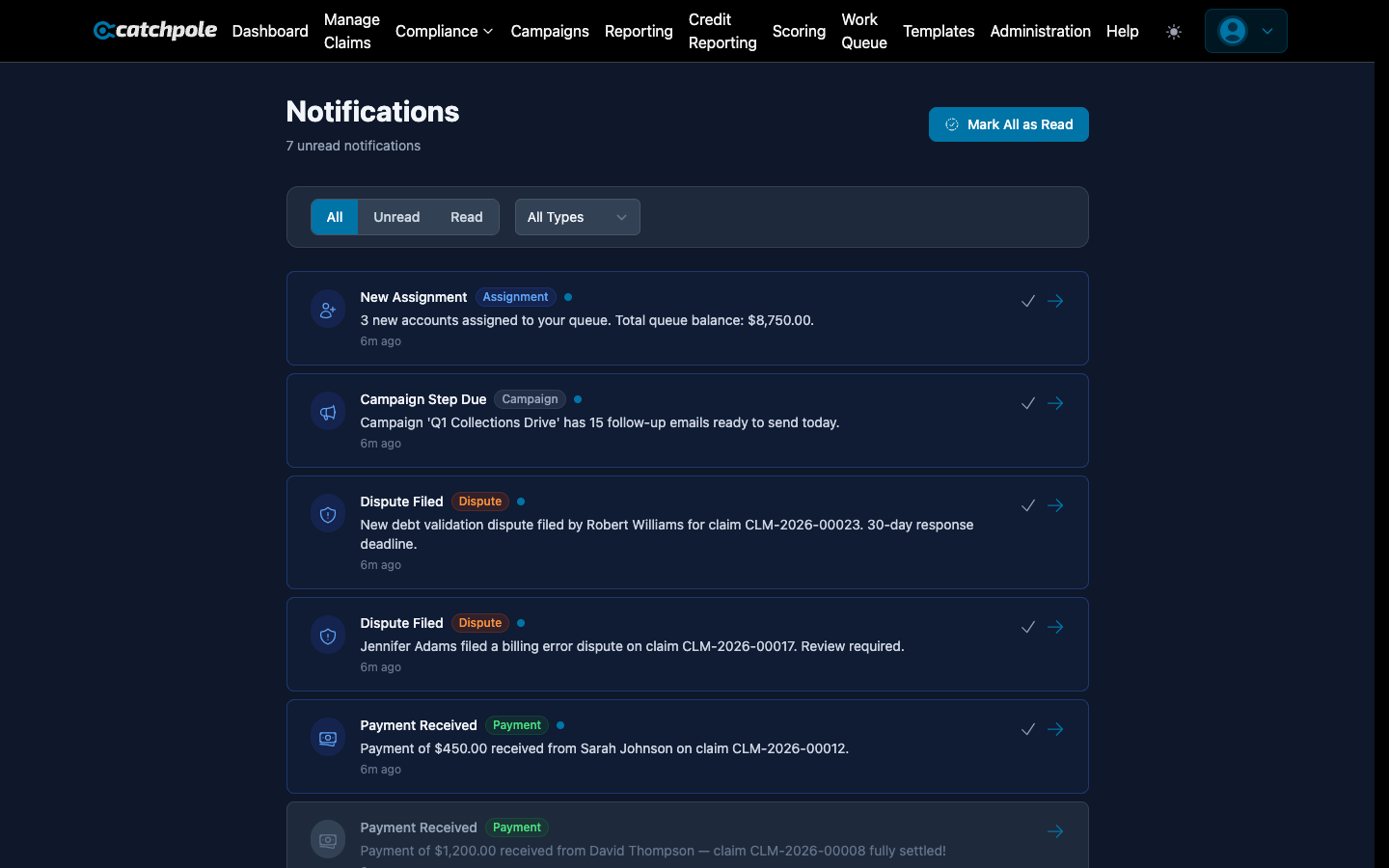
The Notification Center keeps you informed about important events across your collections operation. Payments received, compliance deadlines approaching, team activity — it all shows up here.
Notification Types
- Payment received — when a debtor makes a payment
- Promise broken — when a promise-to-pay date passes without payment
- Compliance alert — approaching deadlines or regulatory events
- Dispute filed — when a new dispute is created
- Assignment — when claims are assigned or reassigned
- Campaign events — campaign milestones and completions
- System alerts — import completions, errors, or warnings
Viewing Notifications
Navigate to Notifications to see all your notifications:
- Unread notifications are highlighted
- Click a notification to see details and navigate to the related item
- Mark as read individually or in bulk
- Filter by notification type
Notification Preferences
Configure which notifications you receive and how:
- In-app — notifications appear in the Notification Center
- Email — receive email alerts for critical events
- Frequency — immediate, daily digest, or weekly summary
Role-Based Notifications
Different roles receive different notifications:
- Owners/Admins — all system-wide notifications
- Managers — team performance and escalation alerts
- Collectors — payment and assignment notifications for their accounts
- Clients — read-only status updates